At some point, every strategy game becomes a content problem.
The rules can be elegant. The renderer can be pretty. The AI can make decent decisions. But if creating and adjusting maps is slow, every gameplay idea becomes expensive to test.
That is why Age of New Worlds has a map editor early.
Not because the game is finished. Not because the editor is polished enough to be a public tool. But because the editor makes the game easier to build.
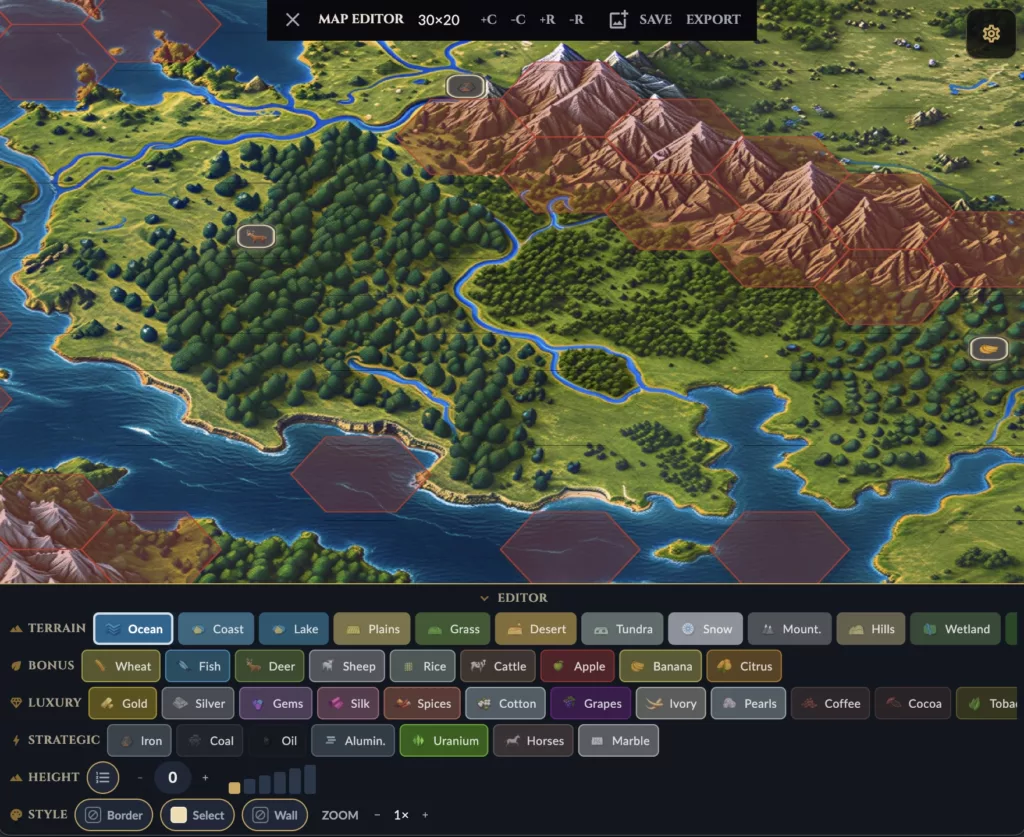
A 4X game lives on its maps. Terrain, resources, height, starting positions, city sites, chokepoints, coastlines, expansion routes, and fog of war all depend on map data. If editing that data requires hand-writing JSON, iteration dies.
The Editor Uses the Same Map Model
The editor does not have a separate fake map format.
It edits the same MapData that the game loads.
class MapData {
  int cols;
  int rows;
  final List<TileData> tiles;
  String? mapName;
  double defaultZoom;
}
Each tile still has terrain, resources, and height:
class TileData {
  final int col;
  final int row;
  final List<TerrainType> terrains;
  final List<ResourceType> resources;
  final int height;
}
That is important. The editor is not painting pixels. It is editing gameplay data.
When I change a tile from ocean to plains, that affects movement, city founding, yields, fog, AI planning, and validation. When I change height, it affects the rendered terrain depth and visibility-related systems. When I add resources, I am changing the economic shape of the map.
The editor is a content tool, but it is also a domain tool.
The Basic Editor Loop
flowchart TD
  Load["Load or Create Map"]
  Select["Select Terrain / Resource / Height"]
  Paint["Paint Hex Tiles"]
  Preview["Preview Tile / Graphic Modes"]
  Save["Save map.json"]
  Export["Export ZIP"]
  Game["Use in Game"]

  Load --> Select
  Select --> Paint
  Paint --> Preview
  Preview --> Save
  Save --> Game
  Save --> Export
The loop is intentionally short.
I want to create or load a map, paint terrain, adjust height, add resources, preview the result, save it, and immediately use it in the game.
That feedback loop matters more than almost any individual editor feature.
EditorWorld Reuses the Hex World
The editor is built on the same rendering foundation as the game map.
class EditorWorld extends HexWorld with KeyboardEvents, HexInputBehavior {
  final MapData mapData;
  EditorState _editorState;
  MapViewMode _viewMode;
  HexDisplaySettings _displaySettings;
}
It uses HexWorld, MapImageLayer, and an editor-specific grid.
_grid = EditorGrid(
  mapData: mapData,
  config: MapConfig.defaultConfig,
  editorState: _editorState,
  viewMode: _viewMode,
  onTileSelected: onTileSelected,
  displaySettings: _displaySettings,
);
This means the editor and game share the same spatial assumptions:
- same hex geometry
- same camera behavior
- same map image layer
- same tile rendering style
- same display settings
- same map data
That reduces drift. If a map looks good in the editor, it is much more likely to make sense in the game.
Painting Tiles
The editor state is small:
class EditorState {
  final Set<TerrainType> selectedTerrains;
  final Set<ResourceType> selectedResources;
  final int selectedHeight;
  final bool heightActive;
}
When the user paints a tile, the editor applies that state to the selected coordinate:
final newTile = mapData.tiles[index].copyWith(
  terrains: editorState.selectedTerrains.toList(),
  resources: editorState.selectedResources.toList(),
  height: editorState.selectedHeight,
);

mapData.tiles[index] = newTile;
This is simple, but the consequences are large. Editing one tile changes the source data that every other system reads.
The editor also rebuilds adjacent tiles when height changes:
// Rebuild adjacent tiles so walls and hidden top outlines stay consistent
// when height changes.
for (final (nc, nr) in _outlineAffectedNeighbors(col, row)) {
  _rebuildTileComponent(nc, nr);
}
That is a good example of why tools need to understand the renderer. Height is not isolated to one tile visually. Neighboring walls depend on it.
Selecting Is Not Painting
One detail I like is that tapping a tile syncs the toolbar to the tile, but does not immediately repaint it.
// Do NOT repaint here — tapping only selects, does not modify the tile.
// repaintSelected() is called only when the user changes the toolbar.
This seems small, but it matters for tool feel.
Selection should inspect. Toolbar changes should edit.
If selecting a tile accidentally overwrites it with stale brush state, the editor becomes stressful to use. Content tools need boring reliability.
Graphic and Tile Modes
The editor can work with both structural tile rendering and graphic map overlays.
The map image can be a single image or sliced per tile. The editor can replace the image, save it, and switch view modes.
if (sliceImage) {
  return MapSaver.saveImageSlices(
    sourcePath: sourcePath,
    mapName: mapName,
    cols: mapData.cols,
    rows: mapData.rows,
    config: MapConfig.defaultConfig,
  );
}

return MapSaver.saveImageCopy(
  sourcePath: sourcePath,
  mapName: mapName,
);
This is useful because map making is not only data entry. Sometimes I want authored art or a reference image. Sometimes I want pure tile readability. The editor supports both without changing the map’s gameplay model.
The image is visual. The map.json is truth.
Saving and Exporting
Saving writes the same JSON format the game loads.
static Future<void> save(MapData mapData) async {
  final safeName = MapStorage.sanitizeMapName(rawName);
  mapData.mapName = safeName;

  final file = await MapStorage.jsonFile(safeName);
  await file.parent.create(recursive: true);
  await file.writeAsString(MapLoader.toJson(mapData));
}
Exporting packages the map folder as a ZIP:
/// The ZIP contains a single folder `<name>/` with:
///   `map.json`
///   `image.png`
///   `1x1.png`, `1x2.png`...
That matters because maps are assets. I want a path from “I made this locally” to “this can be bundled with the game”.
The editor is not just a debug screen. It is part of the content pipeline.
Resizing the Map
The editor can add or remove rows and columns.
void addColumn() {
  if (mapData.cols >= MapConstraints.maxCols) return;

  final newCol = mapData.cols;
  for (int row = 0; row < mapData.rows; row++) {
    mapData.tiles.add(
      TileData(
        col: newCol,
        row: row,
        terrains: editorState.selectedTerrains.toList(),
        resources: [],
        height: 0,
      ),
    );
  }

  mapData.cols++;
  rebuild();
}
This sounds like a convenience feature, but it affects design speed a lot.
Sometimes a map is one column too narrow. Sometimes a coastline needs more space. Sometimes starting positions need breathing room. If changing dimensions means manually editing coordinates in JSON, I will avoid doing it. If the editor makes it easy, I will try more ideas.
Tools shape design behavior.
Showing Gameplay Signals
The editor does not only show terrain. It can also show gameplay markers.
return HexTileMarkers(
  canFoundCity: CitySiteRules.canFoundCityOn(tileData),
  canGrowCity: CityTileYieldRules.canCityControlTile(tileData),
);
It can show whether a tile can support city founding or growth. It can show movement blocker overlays. It can show height badges, resources, and display preferences.
This is important because a map editor for a strategy game should not only answer “what does this look like?”
It should answer “what does this mean for the game?”
Why Build Tools Early?
Building tools early feels like a detour.
There is always another feature to implement. Combat could be better. AI could be smarter. The HUD could be cleaner. Multiplayer could be deeper.
But without tools, every content change costs too much.
An early editor gives me:
- faster map iteration
- better terrain and resource balancing
- easier visual debugging
- easier testing of city founding rules
- a way to inspect height and passability
- a path for authored map images
- a real content workflow instead of hand-edited JSON
Most importantly, it changes how I think. When editing is cheap, I experiment more.
The Editor Is Architecture
I do not think developer tools are separate from architecture.
The editor proves whether the map model is usable. If MapData is hard to edit, that is a design smell. If rendering cannot be reused in the editor, that is a boundary problem. If saving and loading do not round-trip cleanly, that is a persistence problem.
The editor puts pressure on the system in a healthy way.
flowchart LR
  Domain["Map Domain"]
  Renderer["Hex Renderer"]
  Editor["Map Editor"]
  Game["Game Runtime"]
  Storage["Save / Export"]

  Domain --> Editor
  Domain --> Game
  Renderer --> Editor
  Renderer --> Game
  Editor --> Storage
  Storage --> Game
A good internal tool reuses the same core systems as the product. That keeps the tool honest and the product easier to build.
The Rule I Use
The rule is:
If content is central to the game, content creation has to be part of the architecture.
For Age of New Worlds, maps are central. So the map editor matters early.
It is not a side quest. It is how the game learns what its maps need to be.
Leave a Reply